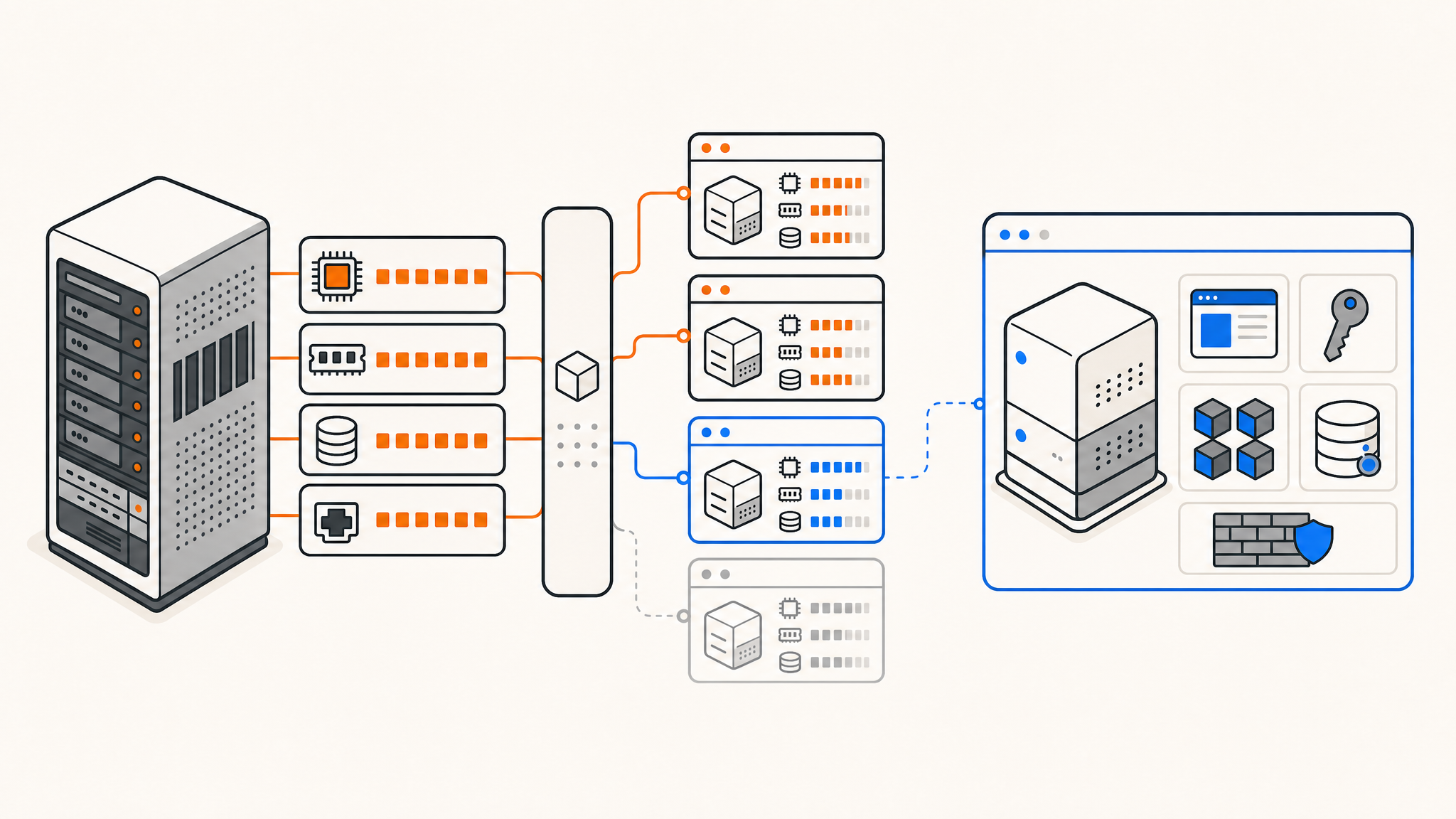
If you've outgrown shared hosting or you're spinning up a project that needs real control over its environment, you've probably heard the term VPS. But what exactly is it, and why does it matter?
This guide breaks down what a VPS is, how the technology works under the hood, and how it compares to other hosting types, so you can decide if it's the right fit for your workload.
What a VPS actually is
A VPS, or virtual private server, is a virtualized environment running on a physical host machine. The host is divided into multiple isolated instances using a hypervisor — software that sits between the hardware and the virtual machines, allocating CPU, RAM, and storage to each one independently.
Each VPS behaves like its own server. You get root access, your own OS, your own networking stack, and resources that aren't shared with other tenants. From your perspective, it looks and feels like a dedicated machine — even though the underlying hardware is shared.
How virtualization works
The magic behind a VPS is the hypervisor. There are two common types:
Type 1 (bare-metal): Runs directly on the hardware with no host OS in between. Examples include KVM, VMware ESXi, and Hyper-V. These offer better performance and isolation.
Type 2 (hosted): Runs on top of an existing OS, like VirtualBox on a desktop. You won't see this in production hosting environments — it's mostly for development and testing.
Most VPS providers use KVM (Kernel-based Virtual Machine), which is a Type 1 hypervisor built into the Linux kernel. KVM gives each VM its own virtualized CPU and memory, making it one of the most performant and well-supported options available. It's the industry standard for a reason.
VPS vs. shared hosting vs. dedicated servers
Understanding the tradeoffs helps you pick the right tool.
Shared hosting puts multiple customers on the same server with the same OS, using software like cPanel or Plesk to carve out isolated spaces. It's cheap, but noisy neighbors are a real problem — if another account on the box spikes CPU, your site slows down too. You also have no root access, so you're limited to what the host allows.
VPS hosting gives you guaranteed resources and a fully isolated environment. Your RAM is your RAM, your CPU allocation is yours, and you're running your own OS. You can install packages, configure the kernel, run Docker, set up custom firewall rules — anything a root user can do.
Dedicated servers hand you the entire physical machine. No virtualization overhead, maximum raw performance. The tradeoff is cost and provisioning time. For many workloads, a well-resourced VPS is indistinguishable from a dedicated server in practice.
What "unmanaged" means
VPS plans are typically sold as either managed or unmanaged.
With a managed VPS, the provider handles OS updates, security patches, monitoring, and sometimes application-level configuration. You pay a premium for that hands-off experience.
With an unmanaged VPS, the provider is responsible for the hardware and hypervisor layer — you handle everything above that. This means you're installing your own OS, managing your own updates, and configuring your own security. It's more work, but you get complete control and typically a better price-to-resource ratio.
Most developers and sysadmins prefer unmanaged, since the whole appeal of a VPS is doing things your way.
What you can run on a VPS
The short answer: anything that runs on Linux (or Windows, if you go that route). Common use cases include:
- Web servers (Nginx, Apache, Caddy)
- Application backends (Node.js, Python, PHP, Go, Rust)
- Databases (PostgreSQL, MySQL, MongoDB, Redis)
- Self-hosted tools (Nextcloud, Gitea, Vaultwarden, Jellyfin)
- Game servers
- VPN endpoints (WireGuard, OpenVPN)
- CI/CD runners and build agents
- DNS servers and mail servers
A VPS is especially popular in the self-hosting community because it gives you the infrastructure flexibility of a home server without the uptime and connectivity concerns of running hardware at home.
How to choose a VPS
A few things worth evaluating before you sign up:
CPU architecture and hardware. AMD EPYC and Ryzen processors have become the default choice for VPS providers who care about performance. Avoid providers that don't disclose their hardware.
RAM and storage guarantees. Many providers oversell resources — advertising 4 GB RAM but running dozens of VMs on a host with less total capacity than the sum of allocations. Look for providers that explicitly guarantee no overselling and use NVMe storage rather than HDDs or SATA SSDs.
Network quality. Bandwidth caps and uplink speed matter. A 1 Gbps uplink is fine for most workloads; 10 Gbps becomes relevant for high-throughput applications or servers serving traffic across multiple regions. Peering at major internet exchanges (like AMS-IX) also affects real-world latency.
Location. Pick a data center geographically close to your users. Latency adds up, especially for interactive applications.
Control panel features. At minimum, you want OS reinstall, reboot controls, VNC access for emergencies, snapshot management, and rDNS configuration. These should be self-service — not a support ticket.
KVM vs. OpenVZ
You'll occasionally see OpenVZ-based VPS plans, which use container-level virtualization rather than full hardware virtualization. OpenVZ VMs share the host's kernel, which limits what you can do — you can't load custom kernel modules, run Docker in some configurations, or always guarantee resource isolation.
KVM is almost always the better choice. Full hardware virtualization means your VM has its own kernel, complete isolation, and no restrictions on what you install.
Conclusion
A VPS sits at the right intersection of control, performance, and cost for most serious workloads. Once you've hit the limits of shared hosting or you need a proper environment for development, staging, or production — a VPS is usually the next move.
Thanks for reading! If you're looking for a VPS with guaranteed resources and no overselling, QDE offers high-performance KVM VPS hosting in Amsterdam backed by NVMe storage, 10 Gbps uplinks, and direct peering at AMS-IX.
Ready to get started or have questions? Contact our team to find the right plan.
Frequently asked questions about VPS hosting
What's the difference between a VPS and a cloud server?
The terms are often used interchangeably, but "cloud server" usually implies infrastructure spread across multiple physical nodes with live migration or high-availability features. A traditional VPS runs on a fixed host. In practice, both use virtualization — the difference is mostly in the underlying architecture and how the provider manages failover.
Do I need a VPS or a dedicated server?
For most workloads — web apps, databases, game servers, self-hosted services — a well-resourced VPS is plenty. Dedicated servers make sense when you need maximum raw I/O performance, specific hardware configurations, or complete physical isolation for compliance reasons.
What OS can I install on a VPS?
Any OS with a supported installer image. Most providers offer Debian, Ubuntu, Rocky Linux, AlmaLinux, and CentOS Stream at minimum. QDE's control panel supports one-click reinstall across all supported distributions.
Is a VPS suitable for beginners?
An unmanaged VPS assumes you're comfortable with Linux administration — SSH, package management, firewalls, and basic system maintenance. If that's new territory, managed hosting or a managed VPS plan is a better starting point.