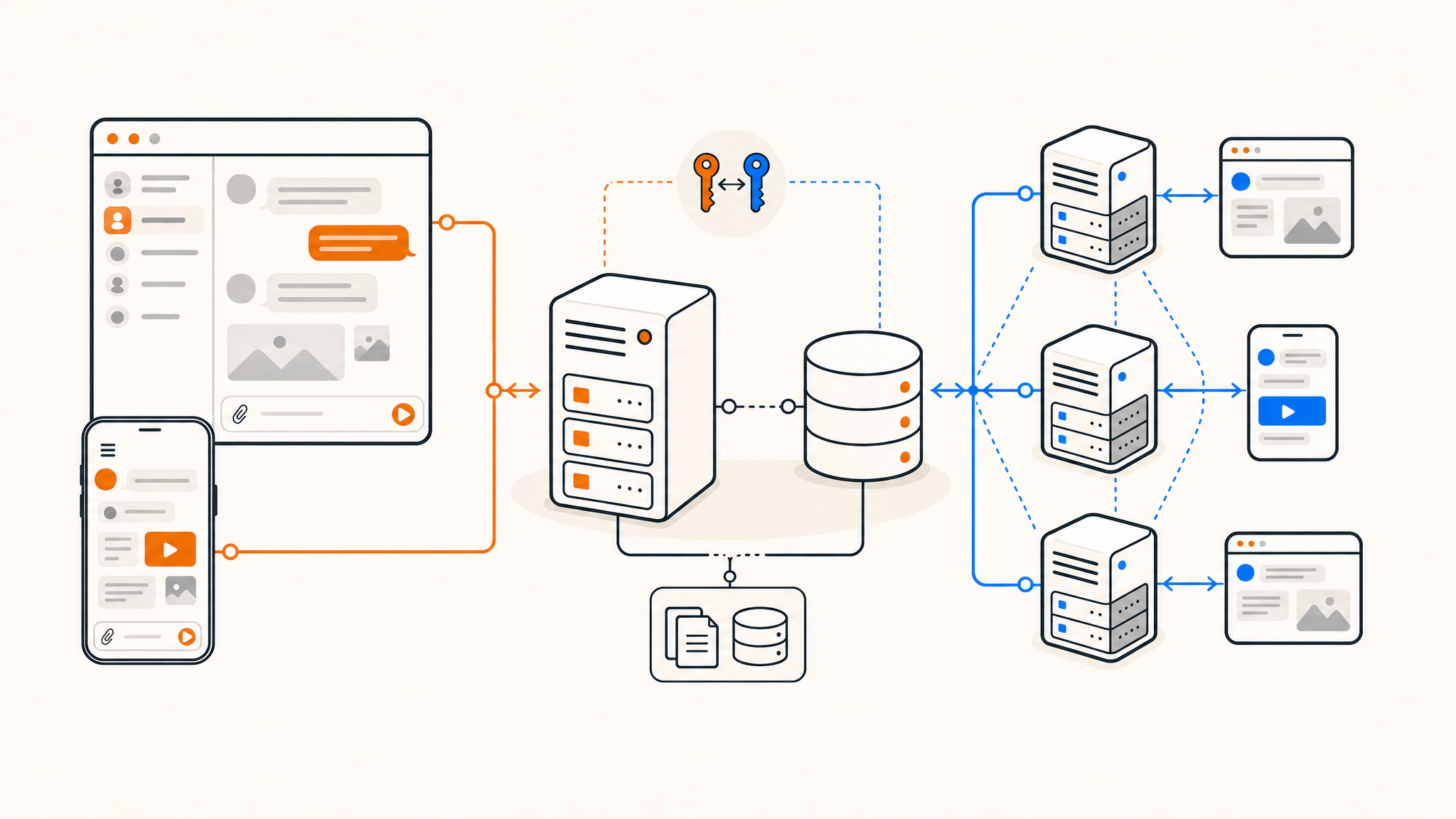
Discord is convenient, but convenience comes at a cost: your messages, metadata, and community data live on someone else's servers. If you've been looking for a way to run your own chat infrastructure without handing your data to a third party, Matrix is worth your attention.
Matrix is an open-source, federated messaging protocol. Unlike Discord, nobody owns the network, anyone can run a homeserver, and users on different servers can still communicate with each other. This guide covers how to self-host a Matrix homeserver using Synapse, on a Linux VPS.
What is Matrix, and why use it instead of Discord?
Matrix is a protocol, not just an app. It defines how messages are exchanged between servers, which means the network is decentralized by design. Two people on completely different homeservers can join the same room and chat in real time, similar to how email works across providers.
Discord, on the other hand, is a closed platform. Your data, your communities, and your communication all run through Discord's infrastructure. There's no export, no federation, and no privacy guarantee beyond what their terms of service say.
Matrix gives you:
- Full ownership of your messages and user data
- Federation with the wider Matrix network (or you can keep it private)
- End-to-end encryption via the Matrix protocol
- A growing ecosystem of clients, bots, and bridges
The most popular Matrix client is Element, which runs on desktop, mobile, and the web. It's a solid Discord-equivalent in terms of UI and features.
Choosing a server to run Synapse
Synapse is the most widely deployed Matrix homeserver. It's written in Python and has a reasonable resource footprint for small communities, though it can get memory-hungry at scale.
For a small to mid-size homeserver (up to a few hundred active users), a VPS with at least:
- 2 vCPUs
- 4 GB RAM
- 40–80 GB NVMe storage
...will get you started comfortably. If you're planning to enable federation with the wider Matrix network, you'll want more headroom, especially RAM.
If you're looking for a good place to host, VPS providers in the Netherlands are a popular choice for privacy-focused projects, thanks to strong data protection laws and well-connected infrastructure.
Prerequisites
Before you start, make sure you have:
- A Linux VPS running Ubuntu 22.04 or Debian 12 (or newer)
- A domain name you control (e.g.,
matrix.yourdomain.com) - DNS A records pointing your domain to your server's IP
- Root or sudo access on the server
- Ports 80, 443, and 8448 open in your firewall
Port 8448 is used for Matrix federation. If you don't plan to federate with other servers, you can skip that one.
How to install Synapse on Ubuntu/Debian
Step 1: Install dependencies
sudo apt update && sudo apt upgrade -y
sudo apt install -y lsb-release wget apt-transport-https
Step 2: Add the Matrix.org package repository
wget -qO /usr/share/keyrings/matrix-org-archive-keyring.gpg https://packages.matrix.org/debian/matrix-org-archive-keyring.gpg

echo "deb [signed-by=/usr/share/keyrings/matrix-org-archive-keyring.gpg] https://packages.matrix.org/debian/ $(lsb_release -cs) main" | sudo tee /etc/apt/sources.list.d/matrix-org.list

sudo apt update
Step 3: Install Synapse
sudo apt install matrix-synapse-py3 -yDuring installation, you'll be prompted to enter your server name. Use your domain (e.g., yourdomain.com), not a subdomain. This becomes your Matrix identity namespace — users will have IDs like @user:yourdomain.com.
Step 4: Configure Synapse
The main config file lives at /etc/matrix-synapse/homeserver.yaml. Open it with your editor of choice and review the key settings:
sudo nano /etc/matrix-synapse/homeserver.yamlKey settings to check or set:
server_name: your domain (already set during install)public_baseurl: set tohttps://yourdomain.comregistration_shared_secret: generate a random string here if you want to create users via command lineenable_registration: set tofalseunless you want open signups
To generate a secure secret string, you can use:
cat /dev/urandom | tr -dc 'a-zA-Z0-9' | head -c 32Step 5: Set up a reverse proxy with Nginx and SSL
Install Nginx and Certbot:
sudo apt install nginx certbot python3-certbot-nginx -yCreate an Nginx config for your Matrix domain:
sudo nano /etc/nginx/sites-available/matrixPaste this configuration:
server {
    listen 80;
    server_name matrix.yourdomain.com;

    location / {
        proxy_pass http://localhost:8008;
        proxy_set_header X-Forwarded-For $remote_addr;
        proxy_set_header X-Forwarded-Proto $scheme;
        proxy_set_header Host $host;
        client_max_body_size 50M;
    }
}
Enable the site and get your SSL certificate:
sudo ln -s /etc/nginx/sites-available/matrix /etc/nginx/sites-enabled/
sudo nginx -t && sudo systemctl reload nginx
sudo certbot --nginx -d matrix.yourdomain.com
Certbot will automatically update your Nginx config to redirect HTTP to HTTPS.
Step 6: Start Synapse
sudo systemctl enable matrix-synapse
sudo systemctl start matrix-synapse
sudo systemctl status matrix-synapse
If everything looks good, Synapse is running on port 8008 locally, proxied through Nginx over HTTPS.
Step 7: Create your first admin user
register_new_matrix_user -c /etc/matrix-synapse/homeserver.yaml http://localhost:8008Follow the prompts to set a username and password. Mark this account as an admin.
Setting up federation (optional)
Federation lets your server communicate with other Matrix homeservers. For this to work, other servers need to be able to reach your server on port 8448, or you need to configure a .well-known delegation so they can find you via port 443.
The simpler approach is the .well-known method. Create a file at https://yourdomain.com/.well-known/matrix/server with:
{
  "m.server": "matrix.yourdomain.com:443"
}
Then update your Nginx config to serve this file from your root domain and configure Synapse to listen on port 8448 with a valid TLS certificate. The Matrix federation docs cover this in detail.
If you want a fully private server for internal use only, you can skip federation entirely.
Connecting with Element
Once your server is running, point Element Web at your homeserver:
- Open Element and click "Sign in"
- Click "Edit" next to the homeserver URL
- Enter
https://matrix.yourdomain.com - Log in with the admin credentials you created
You can also self-host Element Web itself for a fully independent setup, though using the hosted version at app.element.io connecting to your own homeserver is a reasonable middle ground.
Bridges: connecting Matrix to Discord, Slack, and more
One underrated feature of Matrix is bridging. You can connect your Matrix server to Discord, Slack, Telegram, WhatsApp, and more, letting you read and reply from Element while others stay in their apps.
Popular bridges include:
- mautrix-discord — bridge to Discord
- mautrix-telegram — bridge to Telegram
- mautrix-signal — bridge to Signal
Each bridge runs as a separate process and registers as an application service on your homeserver. Setup varies per bridge, but they all follow a similar pattern: install, configure, register with Synapse, restart.
Keeping your server private and secure
A few things worth doing right away:
- Disable open registration unless you want anyone to sign up (
enable_registration: false) - Enable rate limiting in the Synapse config to prevent abuse
- Set up a firewall (ufw or iptables) and only expose necessary ports
- Keep Synapse updated — the project releases security patches regularly
For more on privacy-focused hosting decisions, the best privacy-friendly hosting providers article is worth a read.
Conclusion
Self-hosting a Matrix server takes a bit of setup, but once it's running, you have a messaging platform you fully control. No vendor lock-in, no data harvesting, and you can federate with the rest of the Matrix network or keep things completely private.
Thanks for reading! If you're looking for a reliable place to run your homeserver, QDE VPS hosting offers high-performance plans with NVMe storage and 10 Gbps uplinks, hosted in the Netherlands — a solid match for privacy-first projects.
Ready to get started or want to talk through your setup? Contact our team and we'll help you find the right plan.
Frequently asked questions about self-hosting a Matrix server
What's the difference between Matrix and Discord?
Discord is a closed platform where all data is stored on Discord's servers. Matrix is an open, federated protocol — you run your own server and own your data. The two aren't interchangeable, but Matrix can bridge into Discord if you still need access to Discord communities.
Is Matrix end-to-end encrypted?
Yes, Matrix supports end-to-end encryption in private rooms and direct messages using the Olm and Megolm cryptographic protocols. Group rooms can also be encrypted, though federation and encryption together can introduce some complexity.
How much does it cost to run a Matrix server?
It depends on your user count. A small homeserver for personal or team use can run comfortably on a $5–15/month VPS. Synapse's memory usage scales with active users and room history, so larger communities will need more resources.
Can I migrate from Discord to Matrix?
There's no direct migration tool, but you can use a Discord bridge to run both in parallel while you transition. Over time, communities can move their activity to Matrix rooms entirely.
Do I need a domain name?
Yes. Your server name (and therefore all user IDs) is tied to a domain. You can use a subdomain like matrix.yourdomain.com for the actual server while keeping your root domain clean for identity purposes.
What if I want to host Element Web as well?
Element Web is a static site you can serve from the same VPS using Nginx. Clone the Element Web repository, configure config.json to point to your homeserver, and serve the build directory. It's straightforward to set up alongside Synapse.
Is Synapse the only Matrix homeserver option?
No. Conduit and Dendrite are lighter alternatives written in Rust and Go respectively. Conduit in particular is a good choice for small personal servers where resource efficiency matters more than feature completeness.